🗂️
Šabloni i izbor sadržaja
Sačuvaj više profila, biraj foldere i fajlove i za svaki profil čuvaj režim, odredišta i raspored.
TWO BACKUP je Windows alat za lokalne i mrežne/UNC backup poslove sa šablonima, automatskim rasporedom, FULL / INCREMENTAL / SMART SNAPSHOT režimima i novim FILESYNC UPDATE / MIRROR radom. Za lokalne NTFS izvore FAST NTFS može koristiti USN Journal i preskočiti kompletan scan kada je checkpoint važeći.
FREEWARE verzija podržava osnovne backup funkcije i jedno aktivno odredište po šablonu. Registracija otključava više odredišta i SMTP e-mail obaveštenja.
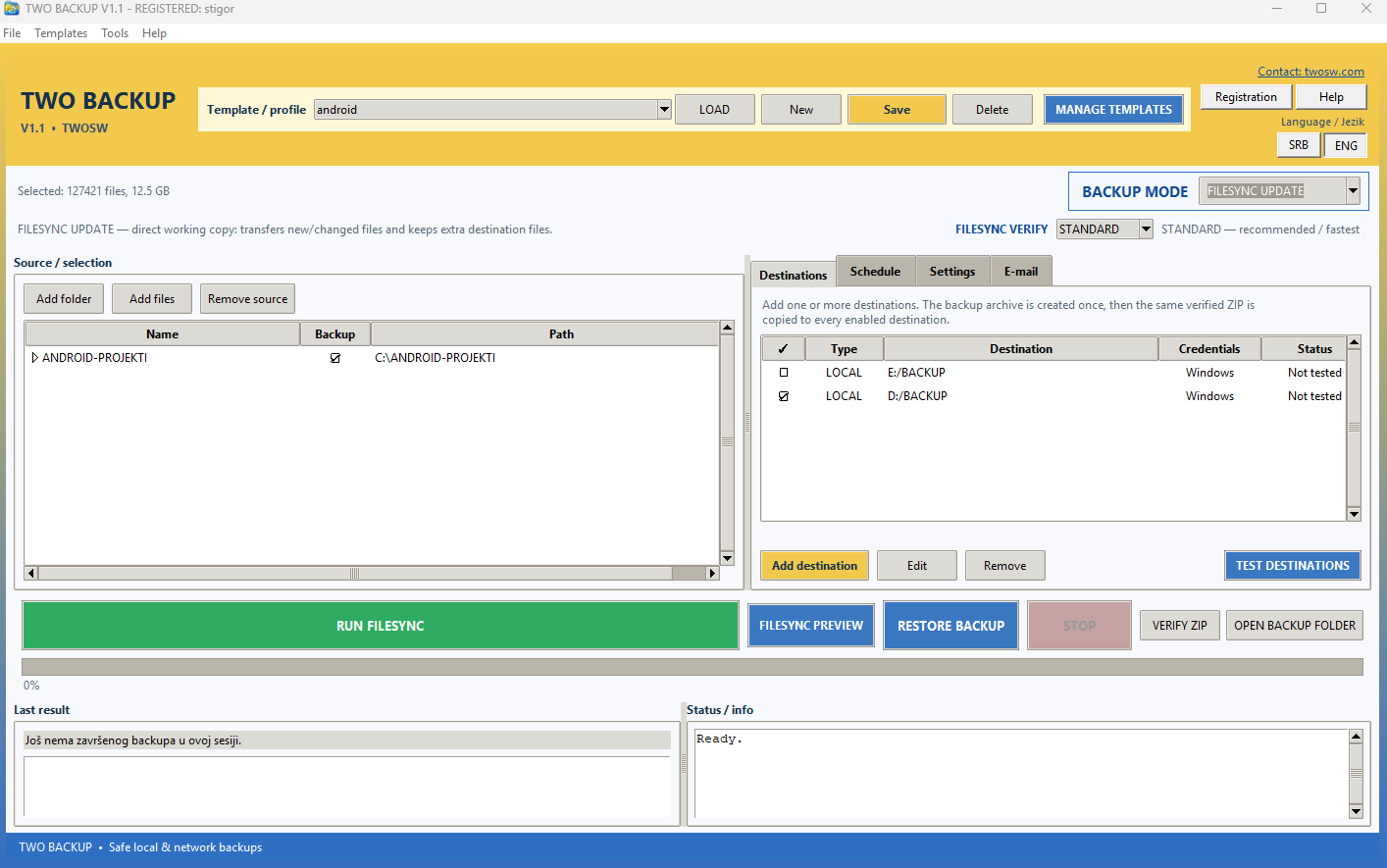
Od ZIP backupa sa istorijom do direktne radne kopije foldera.
Sačuvaj više profila, biraj foldere i fajlove i za svaki profil čuvaj režim, odredišta i raspored.
Lokalni diskovi, mapirani diskovi i UNC lokacije, uz proveru dostupnosti, prava pisanja i slobodnog prostora.
FULL, INCREMENTAL, SMART SNAPSHOT, FILESYNC UPDATE i FILESYNC MIRROR — za različite potrebe i nivoe istorije.
Izaberi dane i više termina dnevno. Ako više poslova dospe istovremeno, trajni red čekanja ih izvršava jedan po jedan.
FULL i SMART SNAPSHOT se vraćaju direktno, a INCREMENTAL restore automatski prati potreban lanac do bazne arhive.
Važeći USN checkpoint može preskočiti puni scan izvora. Ako uslovi nisu bezbedni, TWO BACKUP prelazi na normalno skeniranje.
Kada ne želiš novu ZIP arhivu, FILESYNC održava direktno dostupnu kopiju izabranih podataka.
Prenosi nove i promenjene fajlove, a dodatne fajlove koji već postoje na odredištu ostavlja netaknute.
Održava kontrolisani folder usklađen sa Source-om. Obrisani ili zamenjeni destination fajlovi idu u Sync Trash umesto nepovratnog brisanja.
STANDARD je preporučen za brz svakodnevni rad. SHA-256 radi dodatnu kriptografsku proveru kopiranih fajlova i zato je sporiji.
Kod desetina hiljada sitnih fajlova važni su i files/s, latencija i filesystem — ne samo maksimalni MB/s sa kutije diska.
Za Windows backup odredište preporučujemo NTFS i SSD/NVMe kada je brzina važna. USB flash, spor HDD i exFAT mogu biti znatno sporiji kada se kreiraju hiljade malih fajlova i direktorijuma.
Na istom skupu Android projekata stari eksterni exFAT uređaj je radio oko 0,4 MB/s i 8–10 fajlova/s, dok je eksterni NVMe na NTFS-u dostizao oko 4,3 MB/s i ~51 fajl/s. Ovo je samo praktičan primer — stvarna brzina zavisi od računara, kućišta, interfejsa, antivirusa i strukture fajlova.
TWO BACKUP is a Windows utility for local and network/UNC backup jobs with reusable templates, automatic scheduling, FULL / INCREMENTAL / SMART SNAPSHOT modes and the new FILESYNC UPDATE / MIRROR workflow. For local NTFS sources, FAST NTFS can use the USN Journal and skip a full scan while the saved checkpoint remains valid.
The FREEWARE version includes core backup functions and one enabled destination per template. Registration unlocks multiple destinations and SMTP e-mail notifications.
From versioned ZIP backups to a directly accessible working copy.
Save multiple profiles, choose folders/files and store the mode, destinations and schedule with each profile.
Local folders, mapped drives and UNC locations with availability, write-access and free-space checks.
FULL, INCREMENTAL, SMART SNAPSHOT, FILESYNC UPDATE and FILESYNC MIRROR for different history and working-copy needs.
Choose weekdays and multiple times per day. A persistent queue runs jobs one-by-one when several are due together.
FULL and SMART SNAPSHOT restore directly, while INCREMENTAL restore automatically follows the required chain to its base archive.
A valid USN checkpoint can skip a full source scan. If the fast path is not safe, TWO BACKUP automatically falls back to normal scanning.
When you do not need a new ZIP archive, FILESYNC maintains a directly accessible copy of your selected data.
Transfers new and changed files while keeping extra files that already exist at the destination.
Keeps the managed folder aligned with Source. Removed or replaced destination files go to Sync Trash instead of being permanently deleted.
STANDARD is recommended for fast everyday work. SHA-256 performs additional cryptographic verification of copied files and is therefore slower.
With tens of thousands of small files, files/s, latency and the filesystem can matter more than the advertised sequential MB/s.
For a Windows backup destination we recommend NTFS and SSD/NVMe when speed matters. USB flash drives, slow HDDs and exFAT can be significantly slower when creating thousands of small files and directories.
Using the same Android-project dataset, an older external exFAT device ran at roughly 0.4 MB/s and 8–10 files/s, while an external NVMe on NTFS reached about 4.3 MB/s and ~51 files/s. This is an example, not a guarantee; actual performance depends on the PC, enclosure, interface, antivirus and file mix.